Start developing Check out the billvault git repository to your local machine
shell git clone git@github.com:nuonic-digital/billvault.git Docker PHP 8.4 with Extensions xdebug, ffi, gd, pdo, pdo_pgsql symfony-cliGo Setup Docker Refer to documentation for installing Docker / Docker Desktop:
TIP
Even though this project needs docker-compose, you do not need to install it separately as it comes bundled with your docker installation
TIP
On macOS we clearly recommend OrbStack as a Docker replacement for development
Setup PHP Add the shivammathur/php homebrew tap (package source) to your system
shell brew tap shivammathur/php And install PHP 8.4
shell brew install shivammathur/php/php@8.4 brew link --overwrite --force shivammathur/php/php@8.4 Add the shivammathur/extensions homebrew tap (package source) to your system
shell brew tap shivammathur/extensions And install required extensions:
shell brew install shivammathur/extensions/xdebug@8.4 Updated packages / install required packages for adding the ppa repository
shell sudo apt update sudo apt install -y lsb-release gnupg2 ca-certificates apt-transport-https software-properties-common Add the PPA repository
shell sudo add-apt-repository ppa:ondrej/php Install PHP 8.4 with required extensions
shell sudo apt install \ php8.4 \ php8.4-xdebug \ php8.4-gd \ php8.4-json \ php8.4-zip \ php8.4-curl \ php8.4-pgsql \ php8.4-pdo \ php8.4-ffi \ php8.4-dom \ php8.4-fpm Setup symfony-cli For general instructions, read the manual .
Install symfony-cli using homebrew - for alternatives, see https://symfony.com/download
shell brew install symfony-cli/tap/symfony-cli Start global service for the symfony-cli proxy
shell brew services start symfony-cli Install global ca-certificate in certificate root to allow https development on local machine
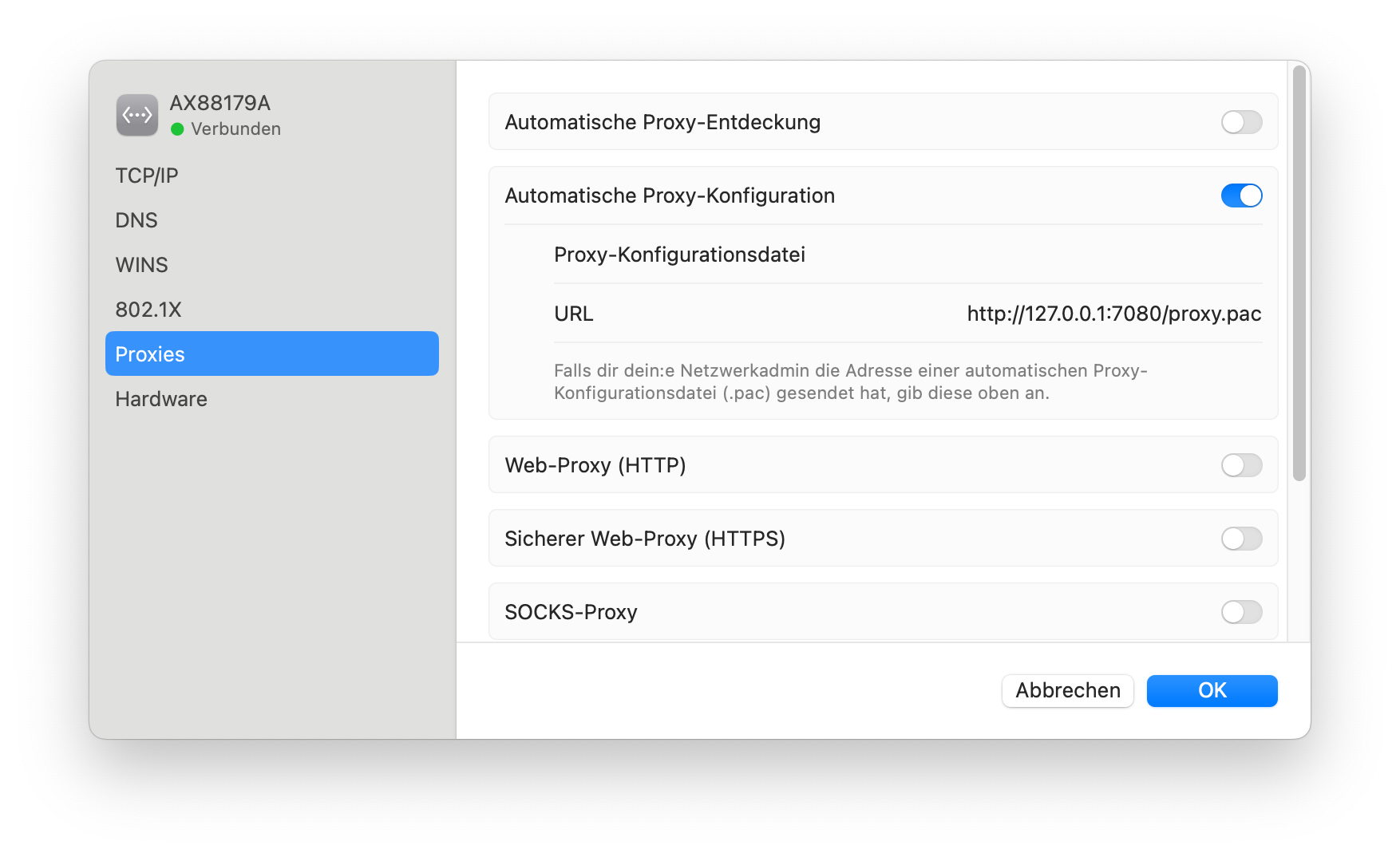
shell symfony local:server:ca:install Configure the system-wide proxy for local domain names in your network settings:
Install symfony-cli inside WSL using the following command:
TIP
If you are running a Debian based Linux distribution in your WSL, apt is preferable as you get updates automatically
Installing with wget / curl might need manual updates in the future.
For the symfony-cli proxy to work (required for local domain names), you need to start the proxy each time you work with symfony projects. The proxy process does not survive restarts.
shell symfony local:proxy:start Install global ca-certificate in certificate root to allow https development on local machine
shell symfony local:server:ca:install You will need to add the root certificate to the windows truststore as well - from within cmd.exe
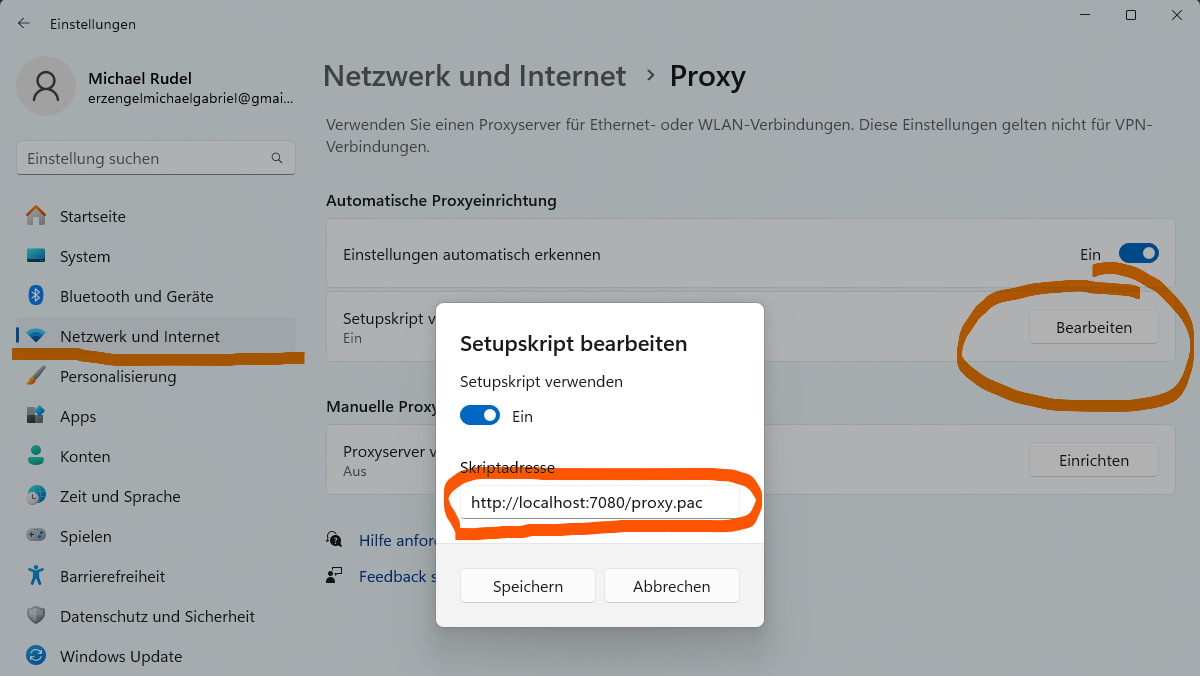
shell certmgr /add /c \\ wsl $ \U buntu \h ome \% USERNAME% \. symfony5 \c erts \d efault.p12 /s /r localMachine root Configure the proxy within the windows host system
CAUTION
Use localhost as the host in your proxy configuration. 127.0.0.1 does NOT work.
Setup Go Follow the instructions here: https://go.dev/doc/install
TIP
GoLand will setup Go automatically when opening a project. You can safely use the included features.
Working on projects appsmtp-serverappdocs contains this documentationWe have an extra section just for document extraction as this process takes place in multiple parts of the application.